Introduction: When Growing Pains Get Real
If you’re leading a support team, you’ve probably felt the heat. Tickets start piling up. Your team is drowning in manual tasks. Data is scattered across tools. Customer expectations are climbing, and suddenly, your team’s reliable process just can’t keep up.
Sound familiar?
That’s the classic sign of a support team on the verge of scaling, and trust me, it’s both exciting and overwhelming. But here’s the truth most managers don’t talk about early enough: scaling isn’t just about hiring more agents. It’s about making your systems smarter, your workflows tighter, and your customer experience seamless. And that’s where Salesforce integration experts come in.
In 2026, this challenge has become even more complex with the rise of AI-powered support operations and Salesforce’s shift toward the “Agentic Era.” Modern Service Cloud environments are no longer built only for human agents – they also need to support autonomous AI agents, real-time data access, and intelligent workflow orchestration.
That’s why Salesforce integration experts are now playing a much bigger role in helping support teams scale efficiently.
Why Support Teams Need to Scale in the First Place
Support teams are often the unsung heroes of customer satisfaction. But as your business grows, so does the complexity of your customer interactions.
You’re not just answering emails anymore. You’re managing live chats, social media tickets, product feedback loops, and internal escalations – all while maintaining SLAs and tracking metrics.
Here’s what scaling really looks like:
- Your volume of customer queries has doubled (or tripled).
- Agents are spending more time searching for data than resolving issues.
- Response times are slipping, and it’s not your team’s fault.
- There’s no single view of the customer – data lives in silos.
- Reporting becomes a nightmare of exports, spreadsheets, and late-night analysis.
At this point, throwing more people at the problem is like trying to fix a leaky boat with more buckets. What you need is a better boat, and that means smarter integration.
Signs It’s Time to Bring in Salesforce Integration Experts
So how do you know when it’s really time to call in the pros? Here are the red flags that shouldn’t be ignored:
Your Tools Aren’t Talking to Each Other
Let’s say your support team uses Salesforce Service Cloud, but your product team logs bugs in Jira, your marketing team uses a different CRM, and your finance team runs on an accounting platform. Your agents flip between tabs like DJs switching tracks, and lose context, time, and efficiency along the way. Salesforce integration experts can stitch these systems together so that data flows without friction. No more copy‑pasting. No more “I’ll get back to you once I confirm with another team.” Just answers, faster.
In today’s Service Cloud environments, integrations are also critical for AI-powered support experiences. Tools like Agentforce rely on accurate, real-time business context to resolve tickets autonomously. That means AI agents need access to customer history, billing systems, product data, internal knowledge bases, and support workflows, all without delays or fragmented data sources.
As AI systems like Agentforce become embedded in Service Cloud, integration shifts from simple system connectivity to enabling real-time decision-making for autonomous agents. These AI agents depend on unified access to enterprise data sources, including CRM records, billing systems, product catalogs, and knowledge bases. Without this grounding layer, AI risks producing incomplete answers, incorrect escalations, or inconsistent customer experiences. Increasingly, integration experts are responsible for building this trusted data foundation and ensuring AI operates within governed, real-time contexts.
For those looking to leverage this technology, our detailed guide, Build AI Chatbot with Agentforce in Salesforce, provides the step-by-step instructions needed to set up and customize an intelligent agent.
Manual Tasks Are Eating Up Agent Time
If your agents are still logging case notes by hand or moving data between platforms manually, you’re not just wasting time – you’re risking accuracy. Automation is one of the superpowers Salesforce experts bring to the table. With the right flows, processes that used to take 30 minutes can be done in seconds and with fewer errors.
Reporting Is Slow, Inaccurate, or Nonexistent
If dashboards don’t update in real-time, or you can’t break down case volume by channel, product line, or customer segment, you’re flying blind. A good Salesforce integration consultant helps set up reporting that actually means something – giving you a crystal‑clear view of what’s working and what needs fixing.
Customers Notice the Gaps
This one hurts the most. When your internal systems don’t talk to each other, customers get inconsistent answers. They’re passed between teams. They hear “we’re still checking” a little too often. And they churn. Integration experts help close those gaps before customers slip through them.
How Salesforce Integration Experts Transform Support Team Efficiency
Here’s where things get exciting. Once you bring in the right Salesforce integration pro, your team doesn’t just keep up – they start pulling ahead.
Why Salesforce Expertise Becomes Crucial as You Scale
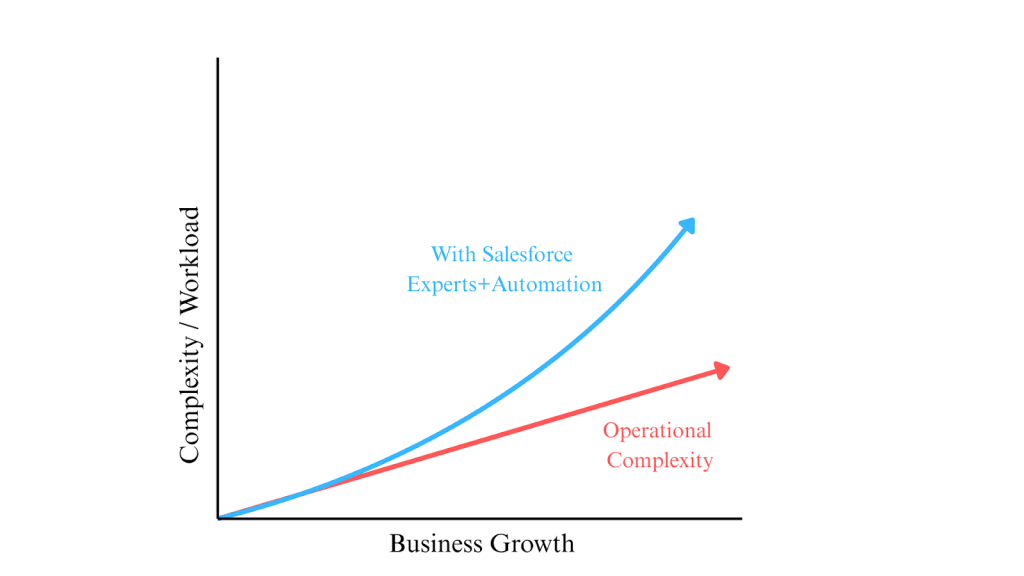
As your company grows, the complexity of your support operations doesn’t increase linearly – it accelerates.
More customers mean more data, more tools, more handoffs, and more chances for things to break. The gap between growth and operational capacity becomes painfully visible, especially when systems aren’t integrated well.
This dynamic is much easier to see than explain – here’s what it typically looks like:
Better Workflows, Fewer Mistakes
Imagine this world: cases automatically created from emails, chats, or web‑forms – with all the right fields pre-filled. Agent handoffs happen seamlessly, with full context. Escalations trigger alerts and are automatically assigned to the right person. That’s not a dream – that’s what a well‑implemented Salesforce automation looks like. In 2026, the conversation has moved far beyond basic automation. According to Salesforce’s 2025 State of Service report, service teams estimate that AI already handles around 30% of customer service cases today, with that number expected to grow to 50% by 2027 as agentic AI adoption accelerates. The same report found that AI jumped from the #10 priority to the #2 priority for service leaders in just one year.
For growing support teams, this changes the role of integration completely. It’s no longer only about connecting systems for human agents. It’s about creating the real-time, trusted data foundation that autonomous AI agents depend on to operate effectively.
Real-Time Insights You Can Act On
When your data sources are integrated, your reports stop being rear‑view mirrors. Suddenly, you can spot trends before they become problems:
- Is one product line generating a disproportionate number of support tickets?
- Are response times lagging after 5 p.m.?
- Did tickets spike after a new release?
Automation + Integration
Also, automation and self-service continue to expand as key drivers of support scalability. Earlier Salesforce “State of Service” data showed case deflection rising from 36% in 2018 to 67% in 2022, while the 2025 report highlights that this shift has accelerated further with AI and virtual agents handling an increasing share of routine customer interactions.
Increasingly, support organizations are also modernizing their data architecture with Salesforce Data Cloud and Zero-Copy approaches. Instead of relying on traditional ETL pipelines that duplicate and move large volumes of support data, teams can now access unified customer data in near real time across systems.
This shift reduces integration complexity and improves performance, especially in AI-driven support environments where real-time context is critical for both human agents and autonomous AI systems.
Scalable Systems That Grow With You
Maybe you’re a 10‑person support team today. But what about one year from now? A well‑integrated Salesforce setup doesn’t need to be rebuilt every time you hire or add new channels. It flexes with your needs. Adding live chat, social media support, or extra teams becomes a matter of configuration – not chaos.
This kind of flexibility is why many support organizations now choose to hire Salesforce consultants to build robust integrations and scalable foundations early.
Working With Salesforce Experts: What to Expect
Not all Salesforce integration projects are the same, but here’s a real‑world breakdown of what working with a good consultant often looks like.
Discovery First, Then Implementation
The best consultants don’t jump into code. They ask questions:
- What tools are you currently using?
- What’s your support process from start to finish?
- Where are your biggest pain points?
From there, they map out an integration plan tailored to your workflow – not just a generic template.
Quick Wins, Then Long-Term Scaling
Most teams want results fast, and you should. Good Salesforce experts often start with “quick wins” that show immediate value (like auto‑creating cases from emails). Then they work on longer‑term projects, like cross‑platform analytics and advanced automation.
Transparency and Documentation
Avoid consultants who keep everything in their heads. You want documentation, admin training, and system diagrams. That way, your team can maintain things without calling someone every time you need a tweak.
Pitfalls to Avoid When Scaling with Salesforce Experts
Scaling with Salesforce experts can bring huge benefits, but there are some traps – things that can make your investment flop if you’re not careful.
- No clear ownership or responsibility. If you don’t define who owns what – consultant, internal admin, support manager – the system might look great on paper, but go unused. For example, automation for case creation works, but nobody updates templates – six months later, the flows are outdated.
- Underestimating change management & training. It’s easy to launch an integration project, but if you skip proper training, agents may resist or use old workflows anyway. Without buy‑in and training, automation can become a source of confusion rather than efficiency.
- Over‑automation: losing flexibility. Sometimes teams try to automate everything and end up with rigid, fragile processes. For instance, a ten‑layer automated approval flow might work now, but once your product or workflow changes, it’s a nightmare to maintain. Better to automate wisely and leave flexibility for human judgment.
- Ignoring data hygiene and governance. If, before integration, your data is messy: duplicates, inconsistent formats, outdated records – integration will simply “glue” chaos together. Clean up your data, define field standards, and make sure only relevant data flows into Salesforce or connected systems.
- Not aligning integration to business goals. If you automate just because “everyone does,” but don’t tie it to real business metrics – average response time, first contact resolution rate, customer satisfaction- then you end up with a fancy system but no clear ROI.
- Overlooking long-term maintenance and ownership. Automation isn’t “set and forget.” Every change – new product, new support channel, new business rule may require tweaks. If you rely on external consultants indefinitely without proper handover or internal admin training, small issues pile up fast.
Scaling Isn’t About Working Harder – It’s About Working Smarter
Scaling isn’t about pushing your support agents to work more, typing faster, or staying online longer. It’s about changing your approach: from reactive chaos to smart, scalable, resilient processes.
Proper integration of Salesforce + your other tools is like upgrading from a rowboat to a speedboat:
- Standardized processes. Instead of manually creating cases, tagging them, and assigning owners, automation handles routine tasks. Agents spend time solving problems, not managing tickets.
- Visibility and control. You get dashboards with real‑time metrics: response times, channel load, ticket backlog, and SLA compliance. That visibility lets you decide when to add headcount or whether a process needs tuning.
- Flexibility as you grow. Add new channels (chat, social media), add new teams, new products – your system grows with you. No major reworks, no broken links, no data silos.
- Focus on customer experience. Agents no longer juggle multiple tools, they have full context and can solve issues faster. That improves customer satisfaction, retention, and loyalty.
That’s why more forward‑thinking teams choose to hire Salesforce consultants early to build strong, scalable systems that survive growth, not just patch problems as they arise.
Actionable Takeaways: What You Can Do Next
- Audit Your Current Tools. Which systems are your agents using daily? Where are the biggest disconnects and time‑sink points?
- Talk to Your Team. Ask where they lose time, what tasks feel repetitive, and where they drop the ball. Let their input guide your priorities.
- Consider a Call with Experts. Even a 30‑minute conversation with experienced Salesforce consultants can uncover big inefficiencies and easy wins.
- Prioritize Quick Wins. Automate one task first (e.g., auto‑create cases from email or chat). See the value quickly.
- Plan for Long-Term Growth. Build systems with flexibility. Clean your data. Document. Train internal admins so you’re not dependent on external help forever.
Integration isn’t a cost – it’s an investment. When done right, it turns your support team from a reactive firefighter squad into a proactive, efficient, customer‑centric engine.
And if you’re ready to scale, it might be time to hire Salesforce consultants who know how to build that engine.
Explore More Blogs