
As Salesforce organizations continue to process massive amounts of data, evaluating Apex Cursors vs Batch Apex to select the optimal asynchronous processing framework is more critical than ever. Whether you are exporting millions of system lines, executing complex calculation pipelines, or updating records across your enterprise, selecting an incorrect processing architecture can lead to severe CPU timeout limit drops, heap allocation failures, and heavy technical debt.
For years, Batch Apex was the uncontested go-to framework for manipulating large-scale data sets. However, the introduction of Apex Cursors introduces a powerful declarative alternative for traversing large query sets while maintaining a minimal memory footprint.
The core question architects face is straightforward: Should you deploy Apex Cursors or stick with Batch Apex? The answer depends entirely on your specific transaction workloads.
Performance & Architectural Comparison at a Glance
| Architectural Feature | Apex Cursors (With Chained Queueables) | Batch Apex (Database.Batchable) |
| Primary Architectural Intent | High-efficiency, memory-optimized data streaming | Bulk asynchronous data processing and manipulation |
| Processing Mechanism | Forward-only incremental pointer chunking | Multi-transaction query locator routing |
| Memory Allocation (Heap) | Extremely Low (Streams data chunks seamlessly) | Moderate to High (Loads the whole scope into memory) |
| Governor Limit Resetting | Requires manual transaction chaining | Automatic per execution batch block |
| Transaction Isolation | Manual design pattern required | Native platform isolation framework |
| State Management | Native via Cursor ID token passing | Requires implementing Database.Stateful |
| Operational Visibility | Custom tracking or standard AsyncApexJob logs | Comprehensive native monitoring UI dashboards |
| Native Scheduling Support | Requires custom Schedulable wrapping | Built-in native scheduling platform engines |
| Primary Workload Profile | Read-Heavy (Data aggregation, exports, AI prompts) | Write-Heavy (Massive DML processing, ERP updates) |
Understanding Batch Apex: The Bulk Processing Workhorse
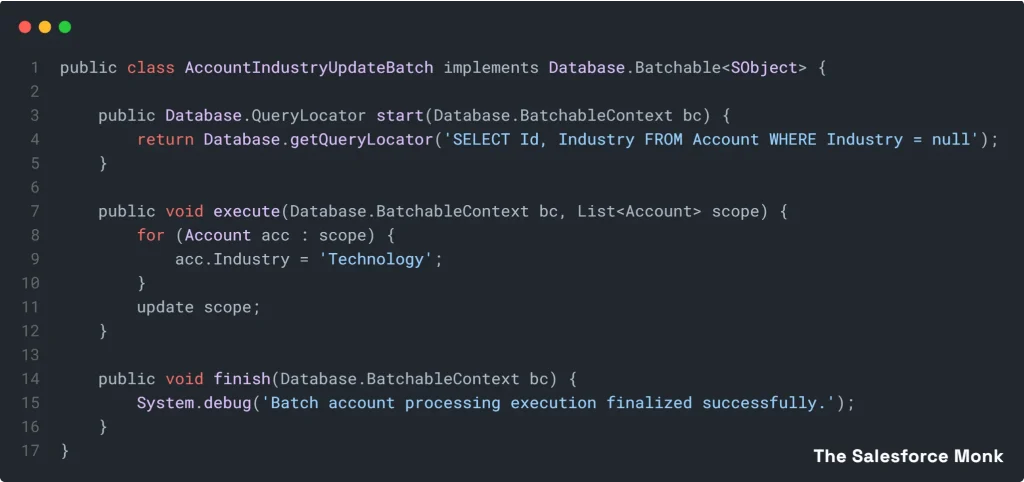
Batch Apex divides an enterprise dataset into isolated execution chunks (defaulting to 200 records per chunk). Each individual block executes inside its own independent transaction boundary, meaning all governor limits (heap, CPU, DML, and SOQL) are completely reset between batch blocks.
Standard Batch Apex Design Blueprint:
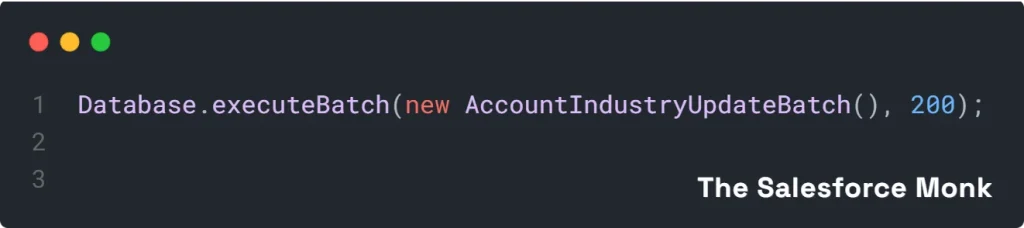
To invoke this batch block within your execution frame:
Best Use Cases for Batch Apex:
- Nightly maintenance routines modify field values across millions of accounts.
- Heavy transactional operations involving multi-object DML statements.
- Data archiving or legacy migration cleanup activities that require built-in retry mechanisms.
Understanding Apex Cursors: High-Speed Memory Agility
An Apex Cursor functions as a high-performance, server-side data pointer. Instead of loading an entire high-volume query array directly into application heap memory, the cursor maintains a secure position on the database server, allowing your code to fetch specific records incrementally.
The Critical Architect Blindspot: Apex Cursors do not automatically bypass transaction limits or auto-reset your governor parameters. If you iterate through a cursor scope repeatedly inside a single execution context, you will crash the transaction via CPU timeout limits or DML limits.
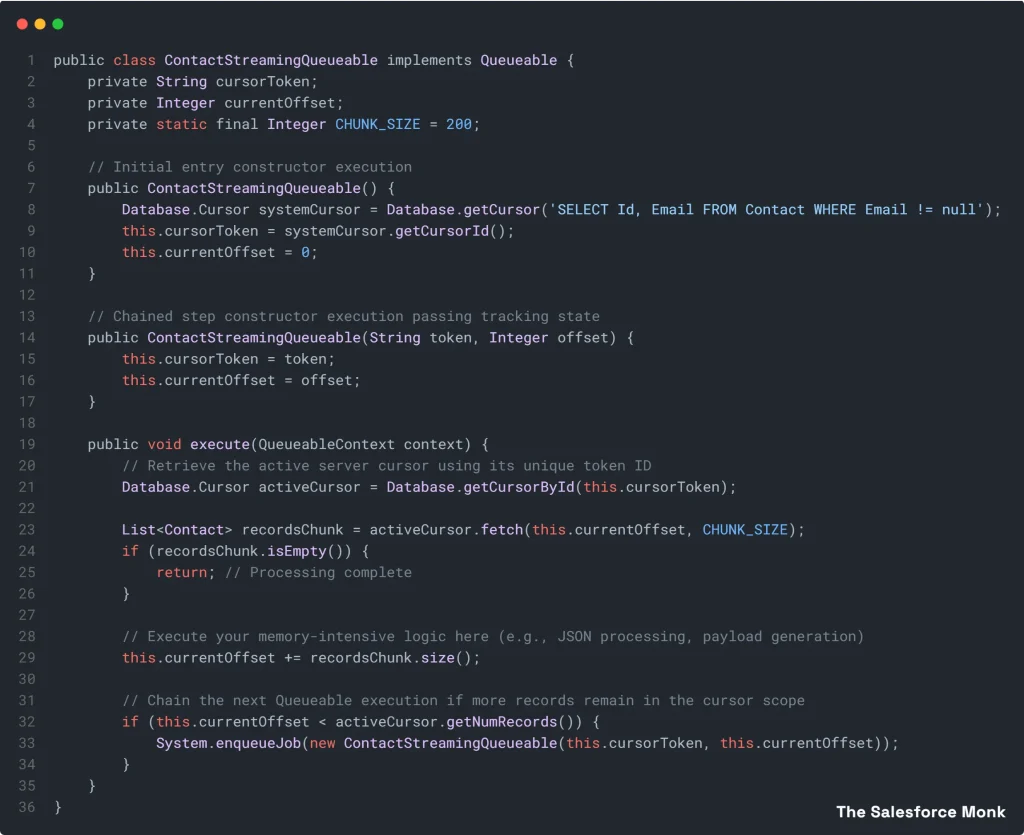
To process millions of records safely, you must chain your cursor across Queueable Apex intervals using its serializable tracking token identifier.
Production-Ready Apex Cursor & Chained Queueable Blueprint:
Best Use Cases for Apex Cursors:
- Streaming record arrays to construct high-volume CSV flat files without generating heap allocation limit exceptions.
- Gathering high-volume transactional context to ground prompts for agentic AI architectures or analytics processing.
- Read-heavy operations where data must be staged, transformed, and passed off to a middleware API layer.
Real-World Scenario Decision Guide
Scenario 1: Exporting 1.5 Million Lines for an Analytics Platform
- The Goal: Aggregate contact parameters and stream them to an external endpoint payload.
- The Verdict: Apex Cursors. Loading these records into standard collection arrays will throw immediate heap limit errors. Cursors pull data in tiny chunks, avoiding memory bottlenecks entirely.
Scenario 2: Executing Global Field Adjustments Across 4 Million Accounts
- The Goal: Standardize account taxonomy and write the updates back to the database.
- The Verdict: Batch Apex. This is a heavy write operation. Batch Apex provides automatic transaction recovery, logging visibility via the UI, and isolated transaction scopes for handling DML locks.
The Monastic Verdict
The decision between Batch Apex and Apex Cursors should never be based on which framework is newer. Instead, evaluate the core characteristics of your workload:
- Choose Apex Cursors when your processing profile is predominantly read-heavy, requires highly efficient streaming traversal, or must manage strict heap limitations.
- Choose Batch Apex when your processing profile is write-heavy, requires extensive out-of-the-box system monitoring visibility, or demands robust, native framework scheduling out of the box.
Next Steps for Your Team:
Join the SF Monk Sangha community to access advanced architectural frameworks, share optimization tips with senior developers, and master next-generation asynchronous patterns for your enterprise environments!
Explore More Blogs